For people who are new to digital creation, choosing the best digital art tablet can often be more difficult than expected. There is a large number of products in the market, ranging from the most basic to those used for professional drawing. There are major differences in sizes, pressure sensitivity, display quality, and connectivity options between the different devices. It is easy for people who do not know their requirements to purchase an unnecessary device.
Not only will an appropriate drawing instrument increase the efficiency of drawing, but it will also enable novices to get used to the process of creating drawings digitally. This is why it is necessary to know the fundamental features and specifications of a digital art tablet prior to buying one.
1. What Is a Digital Art Tablet?
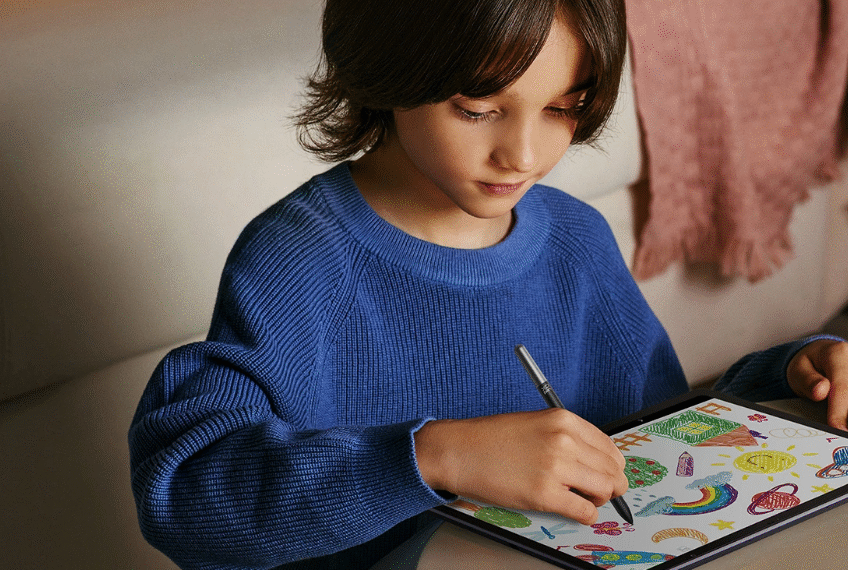
A digital art tablet is a creative device that uses a stylus and a sensitive drawing surface to input digital artwork. Users can move the electronic pen across the drawing area, click, or apply different levels of pressure.The device will then convert the movements into digital signals and transfer them to computers and other terminals via appropriate software.
Compared with a traditional mouse, a drawing tablet can better simulate the pressure changes of real drawing.For instance, pressing lightly creates thin lines, while pressing hard makes thick and dark lines. This tool makes artists draw as if they were using traditional pencils and brushes, giving them a realistic feel.
Presently, the available digital art tablet products in the market can mainly be categorized into two main groups.
Pen Tablets Without a Screen
A pen tablet without a screen requires a connection to a computer. Users draw on the tablet surface while viewing the artwork result on a monitor.
This type has several advantages:
· More affordable price compared with screen models
· Lightweight and easy to carry
· Suitable for beginners with limited budgets
· A practical choice for students and new digital artists
Many users who are just starting digital drawing choose this type because it provides the essential functions needed for learning without requiring a high initial investment.
Screen Drawing Tablets
Screen graphics tablets display the drawing directly on the device’s surface, and thus artists are able to draw on the screen surface as they would on a sheet of paper.
Despite the fact that the cost is relatively higher, this particular kind of graphics tablet eliminates the time needed for adjusting hand-eye coordination. This is due to the fact that there is a direct link between the pen movement and the image produced.
2. Why Do Beginners Need to Choose the Right Digital Art Tablet?
Beginners often think that the more costly the unit, the better the experience will be. But the proper choice of digital art tablets is not about money, but rather about individual needs and intentions for the future.
Before purchasing, beginners should first consider how they plan to use the device.
For example:
· In instances where the objective is simply to learn line drawing and make simple sketches, an entry-level graphic tablet may contain all you need.
· When the goal is to learn how to do character design or concept art for an extended period of time, accuracy in pen strokes and larger surface area become important factors.
· If they want to work in commercial design or professional illustration in the future, display quality and color accuracy become more important factors.
Selection of an inappropriate tool may result in some problems; for example, the size of the workspace may be too small and limit the movement of the hands, making it hard to draw big artworks. Moreover, the lack of a fast response time may lead to significant delays between the movement of the pen and the image on the screen.
It means that beginners need to concentrate on finding a suitable digital art tablet not only now but also in the future.
3. What Key Specifications Should Beginners Consider When Choosing a Digital Art Tablet?
Pressure Sensitivity Affects Drawing Performance
Another factor that makes pressure sensitivity very critical to a digital art tablet is its influence on the ease with which users can control their brush strokes.
Current professional models have pressure sensitivity up to 8192 levels. This means that such tablets are capable of detecting the hand pressure applied and hence making different stroke thicknesses.
For example, pressure sensitivity is especially useful when creating:
· Character illustrations
· Detailed line drawings
· Shadow effects
· Digital watercolor styles
However, pressure levels are not the only factor that determines drawing quality. Also, the actual performance of the product is affected by the pen tip feel, driver optimization, surface feel, and software compatibility.
Resolution and Response Speed Determine Accuracy
The resolution of a drawing tablet is usually measured in LPI (Lines Per Inch), which represents how accurately the device can detect stylus movement.
Another important specification is the report rate. A higher report rate helps reduce input delay and allows lines to appear more stable, especially during fast drawing movements.
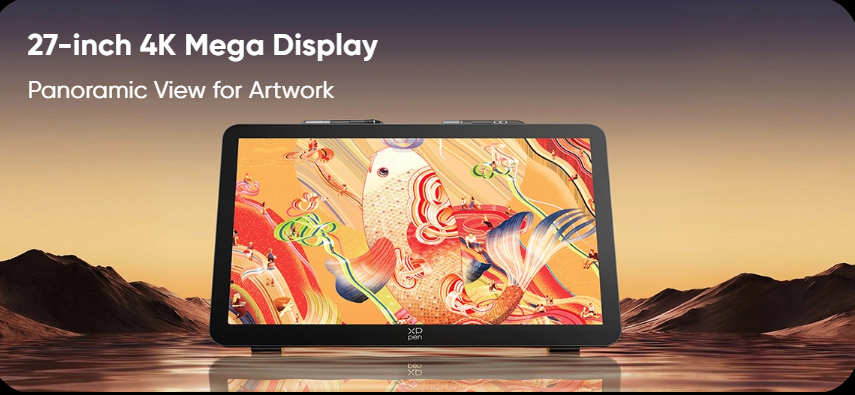
For creators who require professional-level performance, the XPPen Artist Pro 27 (Gen 2) is an example of a high-quality drawing display designed for detailed creative work. It features a 27-inch 4K Ultra HD display, a 120Hz refresh rate, and support for 1.07 billion colors. These specifications allow artists to view fine details, smoother color transitions, and more accurate visual effects when working on complex illustrations.
Color Performance Determines the Final Artwork Quality
When choosing the right tool for their work, digital artists should also take into consideration the ability of the digital art tablet to reproduce colors properly.
Ordinary monitors used in offices may not be able to fully show the differences in color of the images, whereas drawing tools will allow for a broader range of colors and a more stable display quality.
This feature is particularly helpful when making illustrations, game art concepts, and other works related to branding projects, since it eliminates the necessity of frequent corrections and makes the work easier.
See also: Business Class Air Tickets to India: The Ultimate Guide to Luxury and Comfort
4. What Size Digital Art Tablet Should Beginners Choose?
Small-Sized Devices Are Suitable for Mobile Creation
Most digital art tablets that are small in size are often light and compact, thus making them ideal for students, beginners, travelers, or people who have less space on their desks.
Small-sized digital art tablets often have a drawing surface of 6 x 4 inches in size. These tablets are not heavy to carry around and can be used to draw sketches, learn digital painting, or do some minor editing work.
But smaller tablets can become a constraint while working on bigger paintings, as the user will have less space for their hands.
Medium-Sized Devices Are Better for Long-Term Learning
The medium-sized digital art tablet is usually the right balance for most beginners in terms of comfort, efficiency, and cost.
An average drawing surface of about 10 × 6 inches makes it easier for your hands to move freely.
This size is suitable for users who want to:
· Improve digital drawing skills
· Practice detailed illustrations
· Explore different creative styles
· Continue learning for several years
For beginners who are serious about developing their digital art abilities, a medium-sized device usually provides better long-term value.
Large-Sized Devices Are Designed for Professional Creation
Large drawing devices are more suitable for creators who need extensive workspace and detailed control.
They are commonly used for:
· Large illustrations
· Comic production
· Animation projects
· Film and game concept design
For instance, a 27-inch drawing monitor gives a much larger surface on which the work can be done, enabling the user to see the details of the artwork without having to zoom in constantly.
While it might not be needed for all beginners, large devices can certainly prove to be worth the investment for individuals who wish to become professionals in digital artistry.
Conclusion
Finding the best digital art tablet does not boil down merely to price comparison and finding the most technically advanced equipment. The selection of the digital art tablet depends on personal goals, requirements of creation, and the budget available.
If you purchase a digital art tablet, a beginner needs to take into account the following features: pressure sensitivity, drawing surface, performance of the display, software compatibility, and comfort. An amateur artist who is just starting to learn digital drawing can find an entry-level tablet providing a sufficient number of functions. At the same time, professional artists might need to get better quality equipment in terms of high resolution, better color performance, and other characteristics.
The appropriate digital art tablet helps to decrease the time necessary for adaptation, makes drawing more natural, and creates additional opportunities for the future.